
MODEL LAUNCH
Try NVIDIA Nemotron 3.5 Super VL free in Andromity
NVIDIA’s new open multimodal model is free to try on OpenRouter and on NVIDIA’s API catalog. What the model is, and how to run it as Andromity’s model in VS Code or the terminal.
NVIDIA released Nemotron 3.5 Super VL on October 15, 2026. It is an open mixture-of-experts model with 120B parameters, 12B of them active for each token, and it reads text, images, documents and video. Two services host it for free: OpenRouter and NVIDIA’s own API catalog at build.nvidia.com. Andromity supports both as providers, so you can run the model as your coding agent with nothing more than a free API key.
From now on, when a notable model launches and you can run it in Andromity, we’ll publish a post like this one covering the model and how to set it up.
What NVIDIA released
Super VL is the middle model of the current Nemotron lineup. NVIDIA positions Nemotron 3.5 Lightning, with 3B active parameters, for high-volume text work, and Nemotron 3 Ultra, with 55B active, for complex planning and orchestration. Super VL is meant for the multistep work between them, where one task needs reasoning, tool calls and an understanding of what’s on the screen or the page.
It uses a hybrid Mamba-Transformer architecture with multi-token prediction: an internal drafter proposes several tokens and the main model checks them in a single pass. NVIDIA distilled it from Nemotron 3 Ultra and then trained it further on agent actions, code repositories and software engineering tasks. NVIDIA says it beats Nemotron 3 Super on SWE-bench and Terminal-Bench across several evaluation setups, though the launch post doesn’t publish those scores.
The visual training covered charts, tables, OCR, multipage documents and video. Reasoning is on by default, and OpenRouter’s listing says it can be turned off or given a token budget. NVIDIA released base, post-trained and NVFP4-quantized checkpoints together with training recipes, datasets and reinforcement learning environments. The weights are on Hugging Face, and the technical report has the details.
NVIDIA’s numbers
These figures and charts come from NVIDIA’s launch post. We haven’t reproduced them, and none of them were measured in Andromity.
| Evaluation | Nemotron 3.5 Super VL | Comparison |
|---|---|---|
| Hermes Bench | 63.44% | 56.33% for Nemotron 3 Ultra |
| LangChain behavioral evals | 87.05% | 84.3% for Nemotron 3 Ultra |
| CharXiv chart reasoning | 80.8%, or 84% with Python | 63% for Nemotron 3 Nano Omni |
The first two rows are the interesting ones for a coding agent. Hermes Bench and the LangChain evaluations test how a model behaves as an agent, and Super VL scores higher on both than Nemotron 3 Ultra, the model it was distilled from, which has 55B active parameters to its 12B. NVIDIA ran its evaluations in several agent harnesses, including OpenCode, Codex, Claude, OpenClaw and Pi. Andromity wasn’t among them, so judge it on a few tasks from your own repository.
NVIDIA also claims large speed gains. On a single GPU it reports up to 5x the agentic-task throughput of other open models in the same size class, and more than 600 output tokens per second on Baseten’s endpoint. Its SWE-Bench Pro chart shows what that speed costs. Running 10,000 tasks on four B200 GPUs at NVFP4 precision, Super VL finished in about 10.5 hours, while Qwen 3.8 Flash Next and DeepSeek V4 Flash took roughly 50 and 56 hours and Inkling Small about 118. Super VL’s accuracy, about 51.5%, was also the lowest of the four; the other three scored between about 56.5% and 60%.
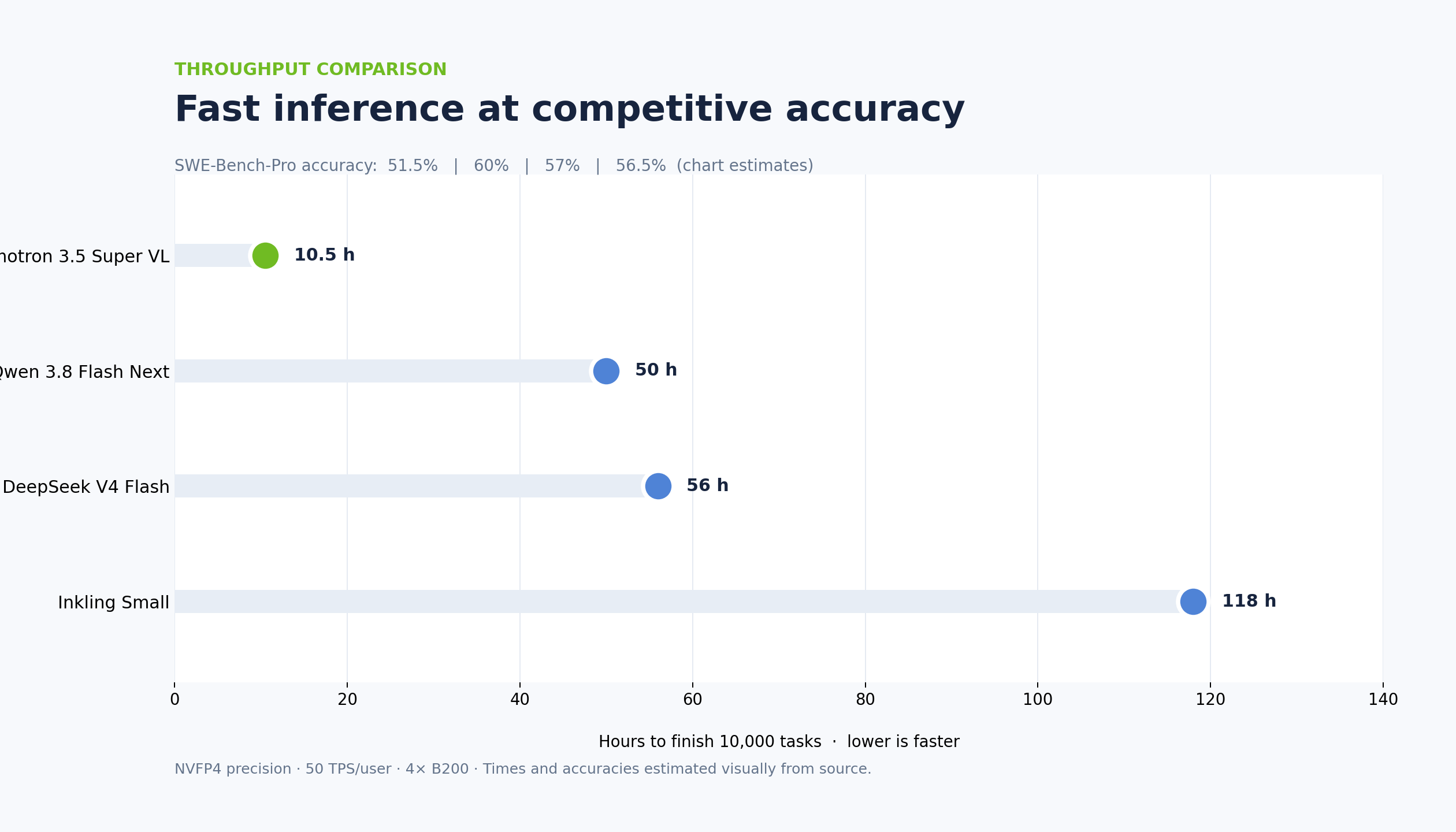
Speed matters more in an agent than in a chat window, because one task is a chain of model calls: read a file, decide, call a tool, read the result, decide again. If you watch the agent while it works, the speed is what you’ll notice first. On a hard bug, the accuracy gap may matter more. The free endpoints are shared, so their speed also depends on load and won’t necessarily match a dedicated deployment.
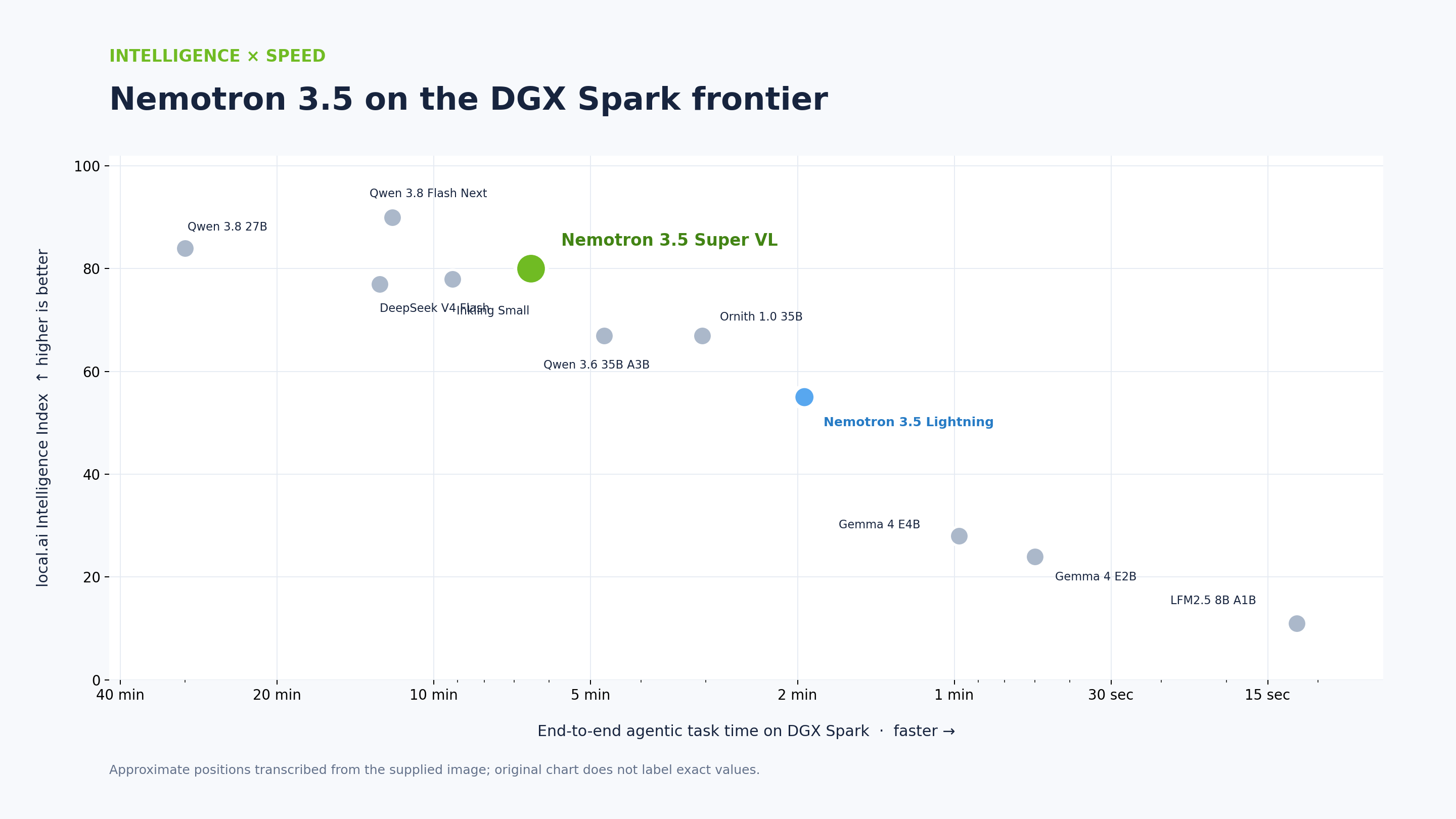
NVIDIA cites an independent evaluation on its DGX Spark desktop that puts Super VL on the frontier of intelligence against task time: none of the models tested there scored higher on the local.ai Intelligence Index while also finishing tasks faster. Qwen 3.8 Flash Next scored higher but took nearly twice as long per task.
Continued pretraining added 10B tokens of Indic-language text, and NVIDIA is releasing the full Indic dataset, about 2.8T tokens across 22 Indian languages, built with IIT Madras and its AI4Bharat lab. On NVIDIA’s five Indic benchmarks the post-trained model scores higher than Sarvam-105B and Gemma-4-31B-It on every one. The widest gap is on Indic FrontierMath, where it scores close to 60 and the other two stay under 30.
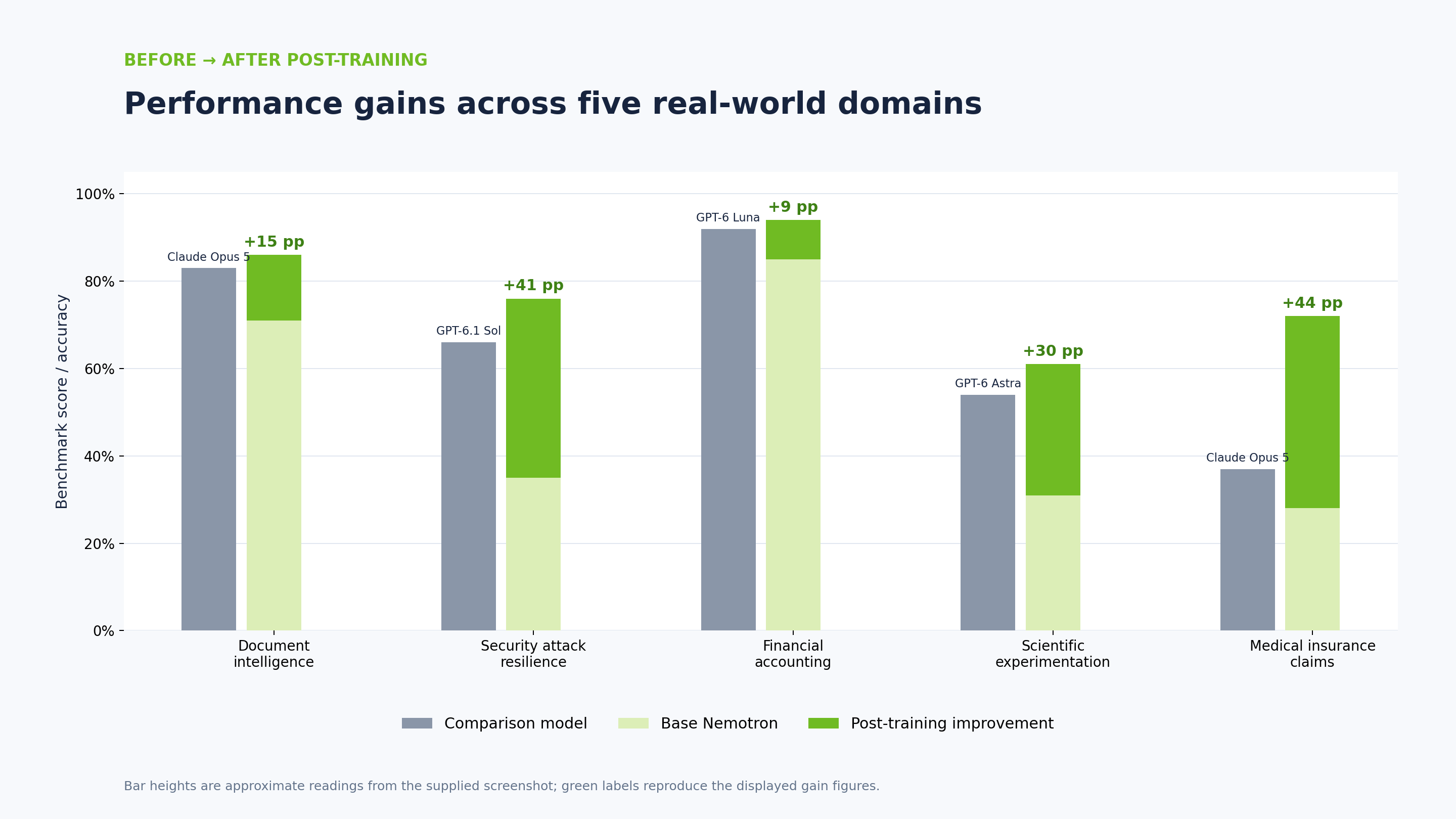
The last chart is about customization. NVIDIA’s customers post-trained Super VL on their own data for five workloads: document intelligence (Scale AI for Skydance), security attack resilience (AI21 and Alice), financial accounting (Ramp), scientific experimentation and medical insurance claims. In every case the base model started below the frontier model it was compared with, such as Claude Opus 5 or GPT-6.1 Sol, and the post-trained version finished above it. The free endpoints serve the general model, so those gains don’t carry over to what you’ll run in Andromity.
One part of NVIDIA’s serving work applies directly to agents. Every request an agent sends repeats the same system instructions, tool definitions and conversation history. NVIDIA’s serving optimizations reuse the computation for that shared prefix and keep both the attention caches and the Mamba recurrent states, so later turns in a session need less processing. Whether a particular hosted endpoint uses those optimizations is up to whoever runs it.
Why a vision model helps in a coding agent
Plenty of software problems reach you as a picture: a layout that breaks at one screen width, a screenshot of an error a user sent, a dashboard chart that stopped updating, a mock-up of a component you haven’t built yet. With a text-only model you describe the picture and hope the description is enough. With Super VL you attach the picture.
Andromity accepts up to five images per message. In the terminal app, press Ctrl+V to paste an image from the clipboard or run /attach with a file path. In VS Code, paste the image into the chat box. Andromity only sends images to models it recognizes as vision models, and model IDs that contain -vl qualify, so both routes below take images.
Option 1: OpenRouter’s free route
OpenRouter lists the free version as nvidia/nemotron-3.5-super-vl:free. NVIDIA serves it, it costs $0 per token, and it has a 1M-token context with up to 131,072 output tokens. The route supports tool calls, forced tool choice, structured outputs and reasoning. Tool calls are the part an agent can’t work without.
Free models on OpenRouter are rate limited to 20 requests per minute. The daily cap is 50 requests until you’ve bought at least 10 credits in total, and 1,000 after that. Andromity sends one request per step of a task, and a task that reads a few files, edits one and runs the tests can take a dozen steps, so 50 a day covers a handful of small tasks.
In VS Code
- Create a key at openrouter.ai/keys. Free models don’t need credits.
- Run Andromity: Settings & API Keys from the Command Palette, paste the key into the OpenRouter card and select Save.
- Open the Model Hub or type
/modelin chat, choose OpenRouter and search fornemotron-3.5-super-vl:free. Andromity loads OpenRouter’s live model list, so the model is there, marked Free.
In the terminal
Save the key, then press Ctrl+L or type /model and pick the model from the OpenRouter list:
/keys set openrouter sk-or-v1-...
To make it the default, merge this into your existing config.toml, at ~/.andromity/config.toml on macOS and Linux or %APPDATA%\andromity\config.toml on Windows:
[default]
provider = "openrouter"
model = "nvidia/nemotron-3.5-super-vl:free"
For a single headless task:
andromity run --provider openrouter --model nvidia/nemotron-3.5-super-vl:free "List the entry points of src/auth and explain what each one does"
If the free limits get in the way, the paid route nvidia/nemotron-3.5-super-vl costs $0.10 per million input tokens and $0.40 per million output tokens, with a 1.05M-token context. It uses the same OpenRouter key, so switching is only a model change.
Before you use the free route on private code, check your OpenRouter privacy settings. NVIDIA is the only provider on the free route. OpenRouter keeps separate training settings for free and paid models, and if you opt out of training it won’t route requests to providers that train on them.
Option 2: NVIDIA’s API catalog
On build.nvidia.com the model is nvidia/nemotron-3.5-super-vl-120b-a12b, listed as a free endpoint with a 262K-token context, text, image and video input, and support for function calling, structured output and reasoning. NVIDIA’s FAQ describes the free tier as rate limited, up to 40 requests per minute for most models with no per-token billing, and the dashboard shows your own limit.
- Sign in at build.nvidia.com and open the Nemotron 3.5 Super VL page.
- Select Generate API Key and copy the key.
- In VS Code, paste it into the NVIDIA NIM card under Andromity: Settings & API Keys and select Save. In the terminal, run
/keys set nvidia nvapi-.... - Choose
nemotron-3.5-super-vl-120b-a12bfrom the NVIDIA NIM models. Andromity downloads NVIDIA’s model list once a key is saved, and the model is in it.
To make it the default in config.toml:
[default]
provider = "nvidia"
model = "nvidia/nemotron-3.5-super-vl-120b-a12b"
NVIDIA’s model list doesn’t include context sizes, so on this route Andromity plans for 128K tokens and compacts the conversation before it gets there. The OpenRouter route reports the full 1M tokens, which helps in long sessions on large repositories.
Read NVIDIA’s trial terms before you use this route on work code. They say your inputs and outputs are recorded to run the trial and to improve NVIDIA’s products and services, including its AI models, and they ask you not to upload confidential information or personal data. That makes the free endpoint a good fit for open-source and personal projects. For private code, use a paid endpoint or run the weights on your own hardware.
Which route to pick
| OpenRouter free route | build.nvidia.com | |
|---|---|---|
| Model ID | nvidia/nemotron-3.5-super-vl:free | nvidia/nemotron-3.5-super-vl-120b-a12b |
| Andromity provider | openrouter | nvidia |
| Context in Andromity | 1M tokens | 128K tokens (the endpoint lists 262K) |
| Rate limits | 20 requests a minute; 50 a day, or 1,000 after buying 10 credits | Up to 40 requests a minute for most models |
| Your data | Training opt-out for free models in OpenRouter’s privacy settings | Trial terms: inputs and outputs are recorded and may be used to improve NVIDIA’s models |
NVIDIA’s FAQ only mentions a per-minute limit, which makes its endpoint the easier one for long sessions. OpenRouter has the larger context, and a paid fallback on the same key when you run out of free requests.
A first task to try
Open a repository you trust and keep SAFE mode on, so the agent asks before each edit and command. Pick a task where the image carries information the text doesn’t:
[screenshot of the settings page at 375px wide]
The Save button overflows its card on this screen. Find the CSS that causes it, fix it without changing the desktop layout, and tell me which breakpoint you changed.
[screenshot of the error dialog]
Users see this error after signing in with an expired invite link. Find where the message comes from, write a test that reproduces it, then fix it.
Watch the tool calls and read the diff before you accept it. If the model answers in prose instead of calling tools, cut the task down to one file. If a provider returns a rate limit error, the error card in VS Code offers Retry Turn and Switch Model. In the terminal, type /retry, or press Ctrl+L to change model, for example to the other free route.
Running it yourself
The weights are open, and NVIDIA lists vLLM, SGLang, Ollama and LM Studio among the inference software supporting the launch. NVIDIA optimized the model for its DGX Spark desktop, which has 128GB of memory. At 120B parameters and 4 bits per weight, the weights alone take about 60GB, more memory than most laptops have, so for most people the free hosted routes are the practical way to try it. If you have the hardware, Andromity connects to Ollama directly (see the Ollama guide), and to vLLM, SGLang or LM Studio as custom OpenAI-compatible providers.